Affiliate Deeplinks and Tracking Parameters: The Mechanics

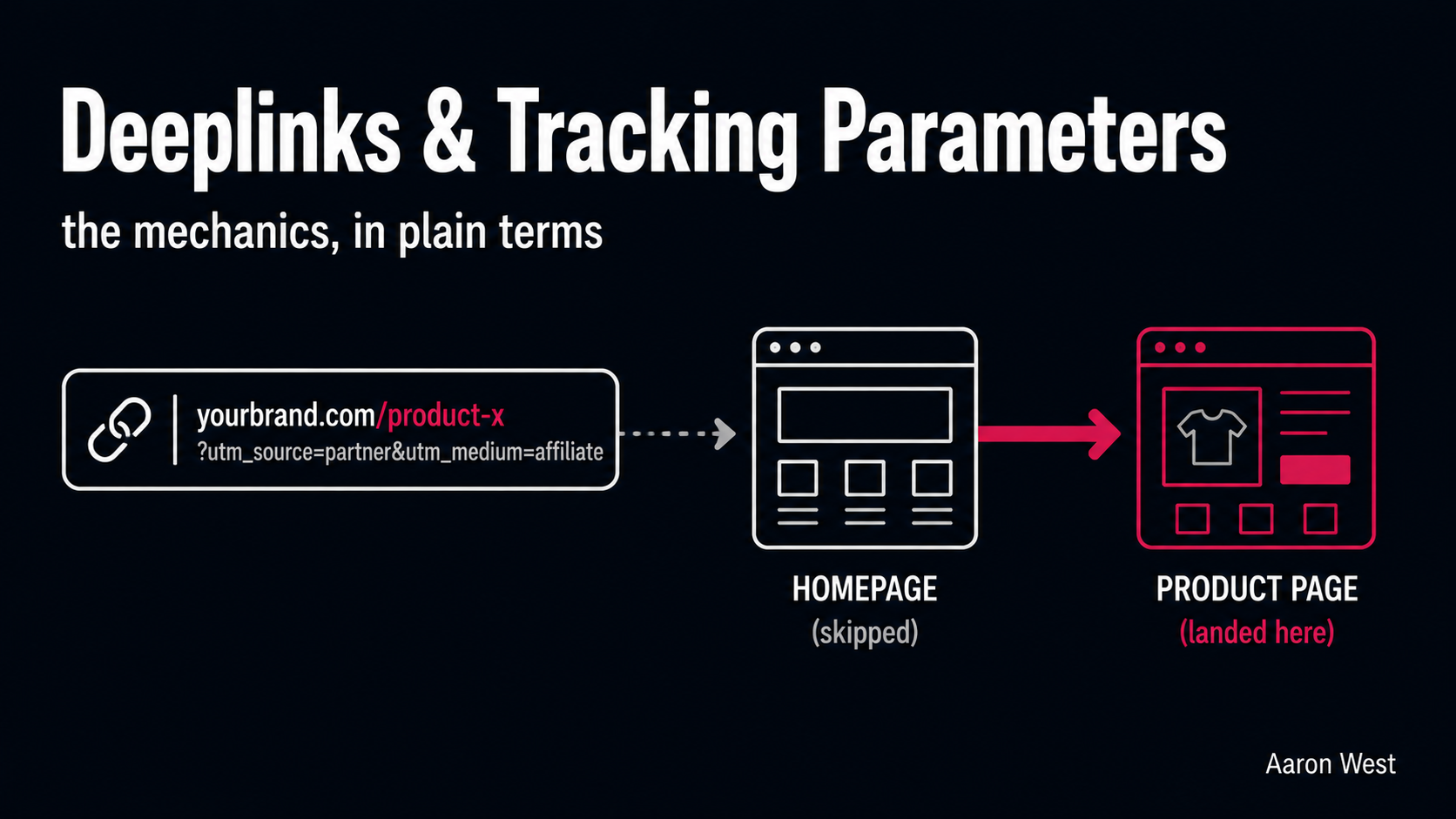
Table of Contents
An affiliate deeplink is a tracking link that sends the shopper to a specific product or category page rather than the merchant's homepage, while still recording which affiliate sent them. It sounds like a small technical detail. It is not. Sending a shopper who clicked a review of one specific product to your homepage, and making them search for it again, is one of the most common and costly mistakes in affiliate setup, because product-specific landing converts far better than dropping people on the front door. Deeplinks fix that, and the tracking parameters bolted onto them are what let both you and your partners actually see what is working.
This is the nuts-and-bolts piece in the tracking layer of the affiliate cluster, sitting under the tracking cornerstone alongside S2S tracking and tracking loss. It is the most "mechanical" topic in the cluster, so I will keep it plain and practical: what a deeplink actually is, what all those parameters in an affiliate URL mean, what SubIDs do and who they are for, and the practical decisions that make this matter to your programme's performance. No coding knowledge needed.
What a deeplink is, and why the homepage is the enemy
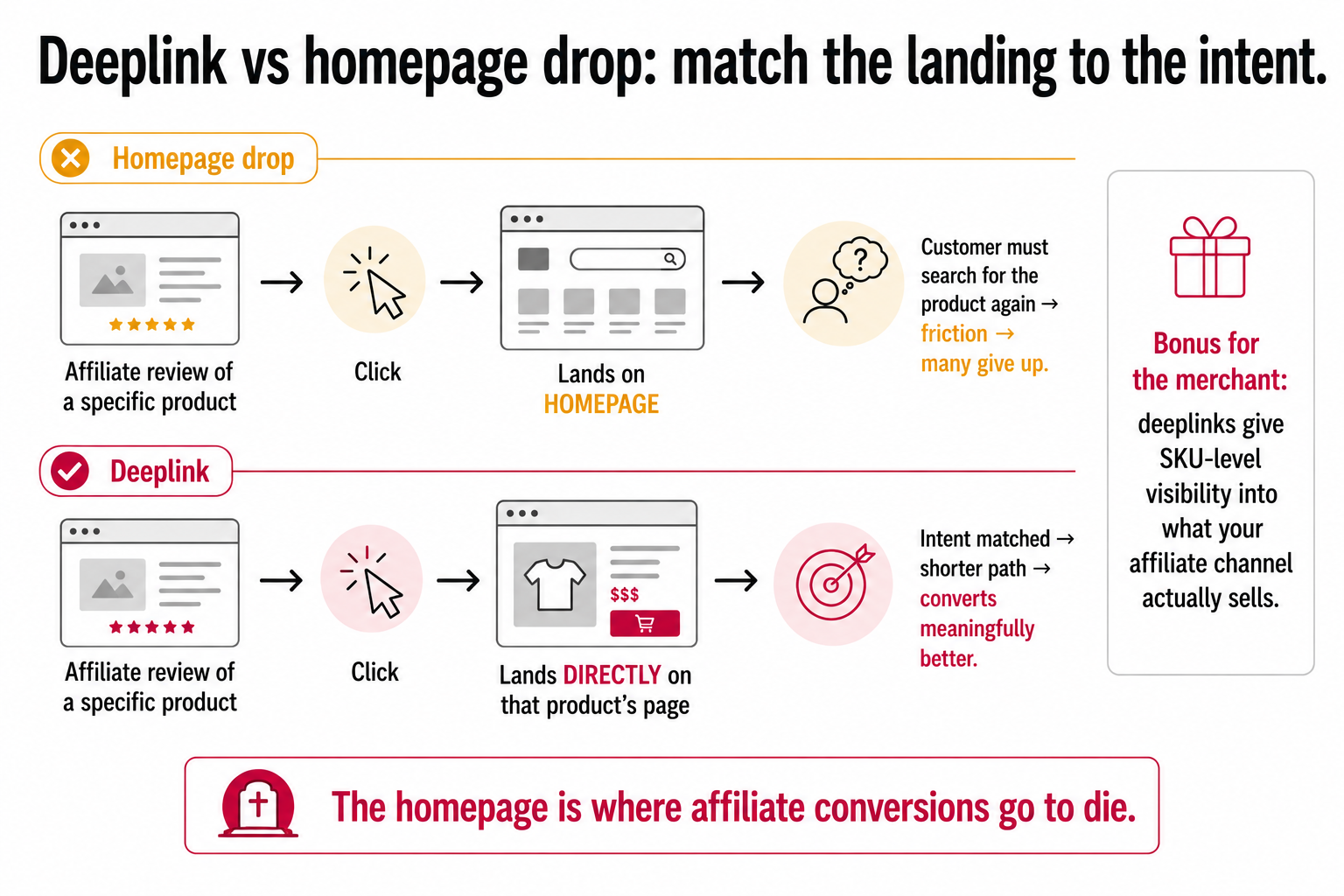
Start with the problem deeplinks solve. A basic affiliate link credits the affiliate but dumps the shopper on your homepage. So a customer reads an affiliate's detailed review of, say, one specific coffee grinder, gets persuaded, clicks the link, and lands on your front page, now having to find that grinder all over again. Every extra step between "I want that" and "here it is" loses customers. Many simply give up.
A deeplink removes that friction by sending the shopper straight to the exact page the affiliate was talking about, the grinder's product page, where purchase intent is highest. The result is a much shorter, more intuitive path to purchase, and product-specific landing pages convert meaningfully better than homepage drops for exactly that reason: the customer arrives where their intent already pointed. The principle is simple and worth stating flatly: match the landing page to the intent the affiliate created. If the affiliate sold a specific product, land the customer on that product. The homepage is where affiliate conversions go to die.
For you as the merchant, deeplinks also unlock something valuable on the reporting side: SKU-level visibility. When affiliates link to specific products, you can see exactly which products your affiliate channel is actually selling, which lets you make smarter decisions about commission rates, featured products, and which partners drive which lines. So enabling deeplinking is not a favour to your affiliates, it is a conversion lever and a data source for you.
The anatomy of a tracking link
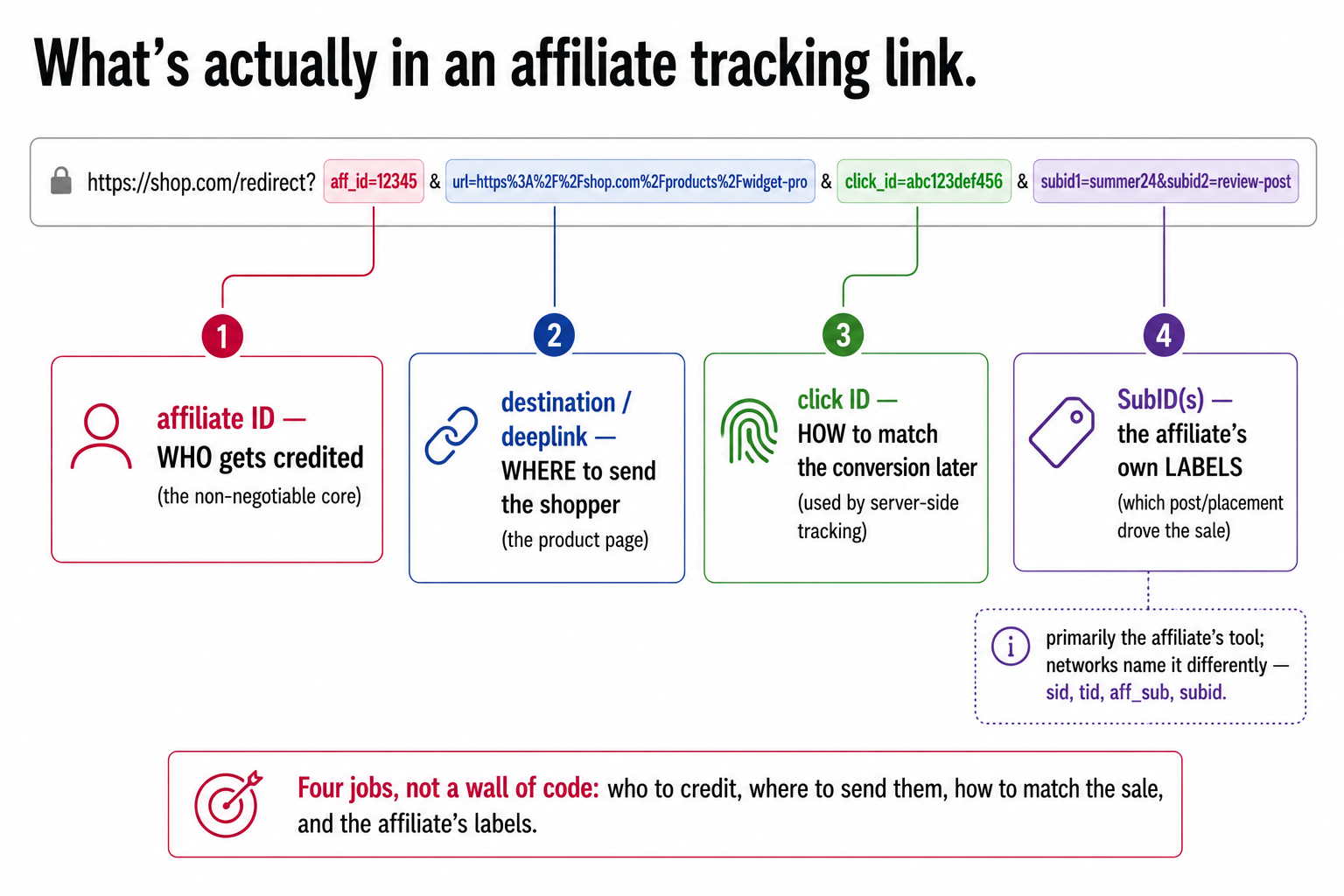
Now the part that looks intimidating and is not: all those parameters in an affiliate URL. A tracking link is just a normal web address with extra information appended after a ?, in name=value pairs separated by &. Each pair carries one piece of tracking information. Strip away the jargon and an affiliate deeplink is carrying, at most, four kinds of thing:
- The affiliate's ID. Identifies who gets credited for the sale. This is the non-negotiable core, without it, no commission.
- The destination. Where to send the shopper, the deeplink target. Often the product URL is itself passed as a parameter (sometimes called a
urlordeeplinkparameter) so the network knows where to forward the click after recording it. - The click ID. A unique identifier generated for this specific click, the thread that server-side tracking uses to match a later conversion back to this exact click. You met this in the S2S piece; this is where it lives in the link.
- SubIDs. Optional extra labels the affiliate adds for their own tracking (more on these next).
That is genuinely it. A scary-looking affiliate URL with a dozen parameters is just these few jobs, plus a network's own housekeeping. You do not need to read the raw string; you need to know it is carrying who to credit, where to send the shopper, how to match the conversion, and any labels the affiliate added. Once you see a tracking link as those four jobs rather than a wall of code, the whole thing demystifies.
SubIDs: the affiliate's own labels
The one parameter type worth understanding properly, because it causes the most confusion and is genuinely useful, is the SubID (sub-identifier). A SubID is a customisable label an affiliate appends to their own link to pass extra information through to their reporting. Think of it as a tag the affiliate attaches so that, when a sale comes back, they can see not just that it converted but where on their site it came from.
A concrete example. An affiliate runs a "best coffee grinders" article and a separate "best espresso machines" article, both linking to you. By putting a different SubID on each link (subid=grinders-post versus subid=espresso-post), they can see in their reports which article actually drove the sales, and write more of what works. They might even tag each individual link on a page to see which placement converts. The crucial point about who SubIDs are for: they are primarily the affiliate's tool, their private segmentation, passed back to them in reporting. As the merchant, you generally see that a SubID was used, but its meaning belongs to the affiliate. (One genuine source of confusion worth flagging: different networks use different names for this same parameter, sid, tid, aff_sub, subid, so the concept is universal but the label varies, which trips people up when working across networks.)
Why this matters to you even though it is the affiliate's tool: SubIDs make your partners better. An affiliate who can see exactly which of their content converts will optimise toward what works, sending you more and better traffic. So supporting SubIDs (letting affiliates pass them and seeing them in your reporting) is, like deeplinking, a quiet way to help your partners help you.
Pass-through parameters: the useful extra
One more capability rounds this out, because it is genuinely handy and underused: pass-through parameters. These let a value travel through the tracking link and land on your site's URL, where your site can act on it. Two common, useful applications:
The first is automatic discount application. Instead of asking a customer to type a promo code (and risk the code-leakage and failed-code friction problems from the coupon piece), you can configure a parameter so that clicking a partner's link applies the offer automatically at the landing page, no code typed, no friction. The second is flexible deeplinking, letting a partner deep-link to any page on your site through the tracking link while still carrying the tracking and any pass-through values, rather than being limited to a fixed set of pre-built links.
These are not essential to a basic programme, but they are the kind of capability that separates a smooth, partner-friendly setup from a clunky one. The general principle: a well-configured tracking link can carry not just who to credit but what to do when the shopper lands, and using that thoughtfully removes friction for the customer and flexibility limits for the partner.
What to actually do
So the practical takeaways on deeplinks and parameters, the mechanical foundation that quietly determines how well everything else performs. Enable deeplinking, always, and make it easy, it is one of the highest-leverage, lowest-effort improvements to affiliate conversion, because matching the landing page to the affiliate's content removes the single most common friction point. Do not make partners dump traffic on your homepage. Support SubIDs so your affiliates can see what converts and optimise toward it, their better data becomes your better traffic. Consider pass-through parameters for auto-applying offers and flexible deeplinking, the polish that makes a programme pleasant to work with. And understand the anatomy well enough to debug it: when an affiliate says "my conversions aren't tracking," the cause is very often a broken or stripped parameter in the link, a missing click ID, a mangled deeplink, a dropped affiliate ID, and knowing the four jobs a link does is what lets you spot which one failed.
That completes the mechanics. A deeplink matches the landing page to the intent the affiliate created, which is the cheapest conversion win in the channel. The parameters on a tracking link are just four jobs, credit the right affiliate, send the shopper to the right page, carry a click ID to match the sale, and pass the affiliate's own labels, dressed up as a scary URL. SubIDs are the affiliate's private segmentation that you should support because it makes them better partners, and pass-through parameters are the polish that removes friction. None of this is glamorous, and all of it is foundational: get the links right and every other part of your programme, tracking, attribution, commission, has something clean to work with. Get them wrong and you are losing conversions and credit at the most basic level, before any of the clever stuff even starts.
A few common questions
What is an affiliate deeplink? An affiliate deeplink is a tracking link that sends the shopper directly to a specific product or category page rather than the merchant's homepage, while still recording which affiliate referred them. Because it lands the customer exactly where their intent points, instead of making them search the homepage again, deeplinks convert meaningfully better, and they give merchants SKU-level visibility into which products the affiliate channel actually sells.
What are the parameters in an affiliate tracking link? A tracking link is a web address with extra name=value pairs appended after a ?. They carry, at most, four kinds of thing: the affiliate's ID (who to credit), the destination or deeplink (where to send the shopper), a click ID (a unique identifier used to match a later conversion back to this click), and optional SubIDs (the affiliate's own tracking labels). A long, intimidating affiliate URL is just these few jobs plus the network's housekeeping.
What is a SubID in affiliate marketing? A SubID (sub-identifier) is a customisable label an affiliate appends to their own link to pass extra information into their reporting, for example, which article or placement drove a sale. It's primarily the affiliate's tool: it lets them see which of their content converts so they can do more of what works. Different networks name the same parameter differently (sid, tid, aff_sub, subid), which is a common source of confusion when working across networks.
Should merchants enable affiliate deeplinking? Yes, almost always. Deeplinking is one of the highest-leverage, lowest-effort ways to improve affiliate conversion, because matching the landing page to the affiliate's content removes the most common friction point (making customers re-find a product on the homepage). It also gives you SKU-level data on what your affiliate channel sells. Supporting SubIDs and pass-through parameters (like auto-applying an offer) further helps partners and reduces customer friction.
You should also read:
Affiliate Fraud: The Types, the Detection Methods, and the Controls
Affiliate fraud is any attempt to earn commissions for results that were not genuinely driven, faked clicks, faked leads, or stolen attribution, and because the whole channel pays for results, it has always attracted people who try to fake results. The defining shift in 2026…
Continue reading...
The Affiliate Marketing Glossary: Every Term, in Plain English
Affiliate marketing is full of acronyms and jargon, CPS, EPC, S2S, dedup, postback, cookie window, that can make a simple channel sound impenetrable. This glossary defines the terms that actually matter, in plain English, grouped so you can see how they fit together. Each definition…
Continue reading...
The Affiliate Publisher Landscape: Every Partner Type, Explained
"Affiliate" covers wildly different kinds of partner, content sites, cashback platforms, coupon sites, influencers, comparison engines, and the single most important thing to understand is that they do fundamentally different jobs. Some genuinely introduce new customers to your brand; others mostly intercept customers who were…
Continue reading...