The Error Notification Is the Workflow

Table of Contents
In December 2025, one of Amazon's own internal AI tools failed and quietly took down a system for thirteen hours before anyone noticed. Thirteen hours. At Amazon. With Amazon's engineering resources and monitoring budget behind it.
I open with that because it settles an argument I have had more times than I can count. When I tell people that the most important part of any automation is the bit that tells you when it broke, the common reply is some version of "that won't happen to us, we'll notice." Amazon did not notice for thirteen hours. The idea that a small team will catch a frozen workflow at 2am through sheer vigilance is not realistic. Silent failure is not a skill problem. It is a systems problem, and it gets solved with a system.
Here is the principle I would put above every other piece of automation advice: a silent failure is worse than no automation at all. The notification that tells you something broke is not a nice-to-have bolted onto the workflow. It is the workflow. Everything else is just the part that runs when things go right.
Why silent failure is worse than no automation
This sounds like an exaggeration. It is not, and the logic is worth following carefully.
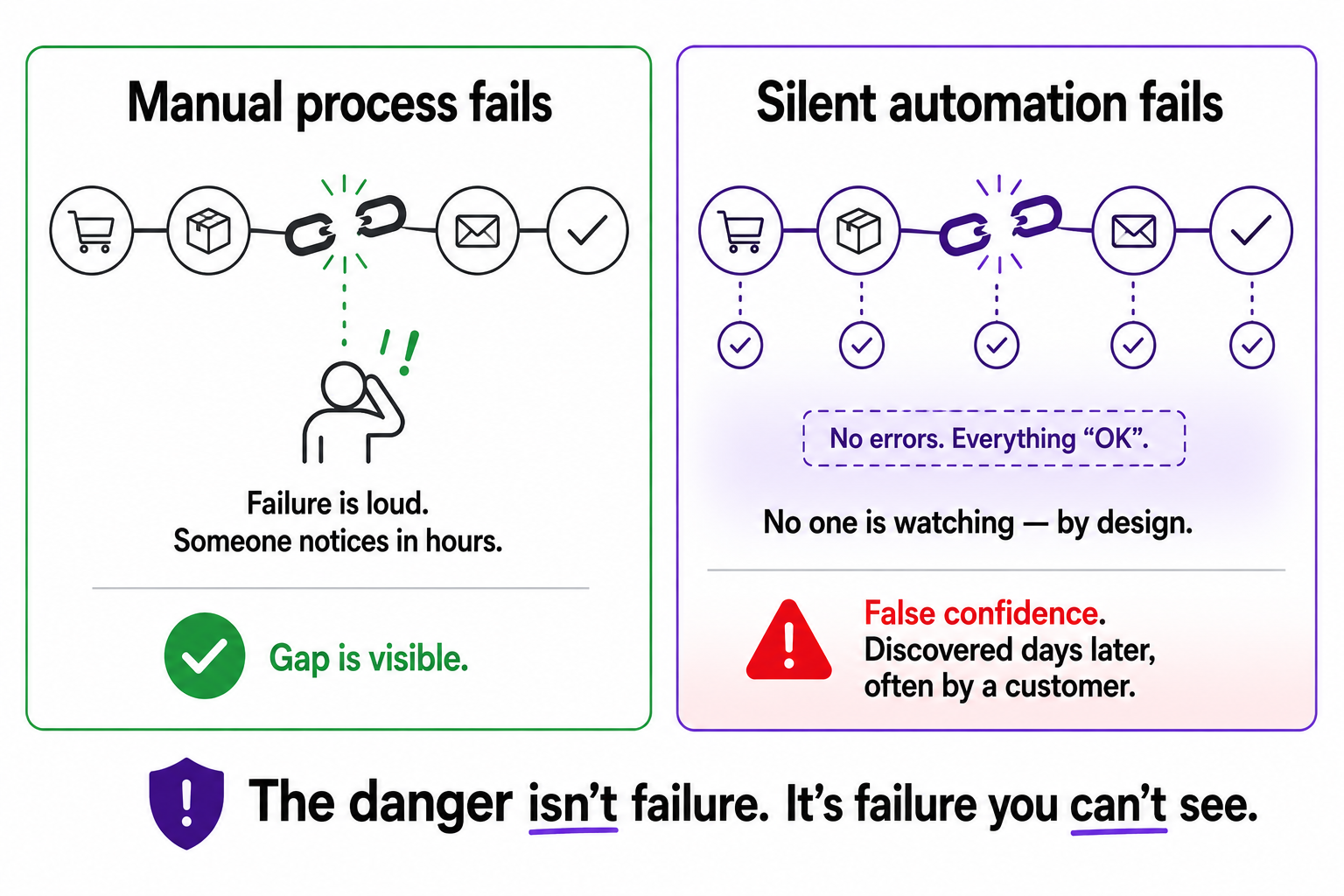
When a manual process fails, the failure is loud. The person who pulls the Monday report is off sick, so the report does not appear, so someone notices within hours and chases it. The gap announces itself. Manual processes fail in your face.
Automation removes the person, and with them, it removes the noticing. The whole point of automating the report was that nobody had to think about it anymore. So when the automation breaks quietly, an expired API token, a field that got renamed, a service that went down for an hour, there is no one watching, because you specifically built the thing so no one had to watch. The report stops appearing and nobody chases it, because everyone assumes it is handled. It was handled. Until it wasn't.
That is the trap. With no automation, a broken process is obvious. With broken-and-silent automation, you have something worse than nothing: false confidence. You are trusting a system that is no longer doing its job, and you will keep trusting it right up until the damage surfaces somewhere downstream, usually in front of a customer.
The cost is proportional to how long it runs unseen
The defining feature of a silent failure is that its cost grows with time, because nothing stops it. A loud failure is bounded, you fix it and move on. A silent one compounds.
Take a concrete example from the world of marketing automation. A lead-routing workflow develops a quiet fault and starts sending a chunk of inbound enterprise leads into the wrong follow-up sequence. Nothing crashes. The dashboard looks normal. Three weeks later someone notices the good leads went cold, and by then the pipeline damage for a mid-sized company can run into six figures of delayed or lost deals. The failure itself was tiny. The duration is what made it expensive.
This is the pattern everywhere. An inventory sync that silently stops overselling stock for a fortnight. A pricing rule that quietly stops updating and leaves you selling against last month's competitor prices. A backup job that has not actually run since March. The break is small and cheap. The weeks of running broken-and-unseen are what cost you. Which means the single highest-value thing you can add to any automation is not more elegance. It is a shorter time-to-detection.
What a monitoring step actually is
The good news is that closing this gap is genuinely cheap. You do not need an enterprise observability platform to start. For most e-commerce automations, a monitoring step is three simple habits.
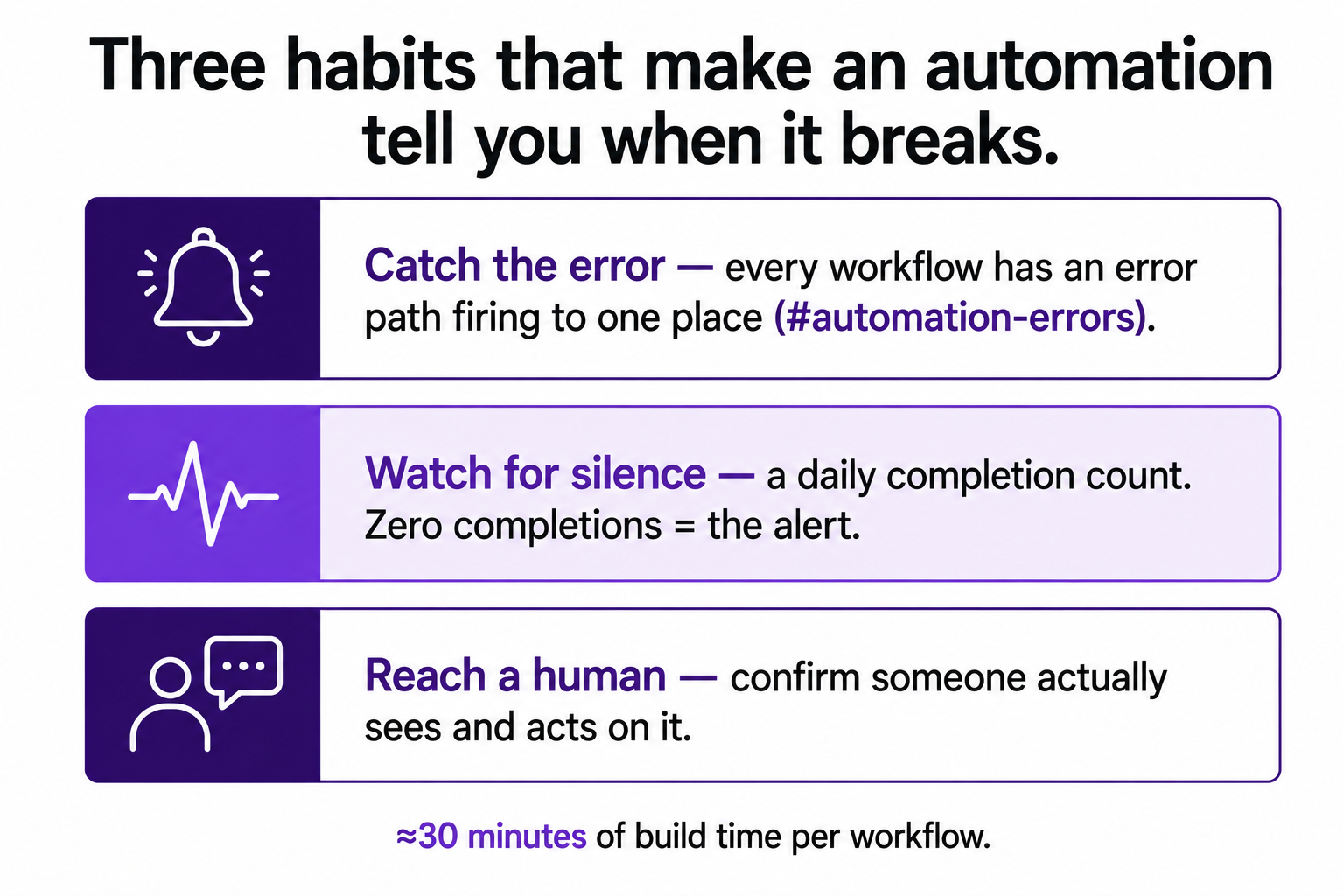
First, catch the error and announce it. Every workflow should have an error path, not just a success path. When a step fails, that error output should fire a message somewhere a human will see it: a dedicated Slack channel, an email, whatever you actually check. The practitioners who do this well keep a single channel, often literally called something like #automation-errors, where every workflow reports its failures in one place.
Second, watch for silence, not just errors. This is the subtle one. Some failures do not throw an error, they just stop. The workflow that was supposed to run and simply did not run produces no error message, because it never started. So the stronger pattern is a heartbeat: a daily or per-run summary that counts completions. If a workflow that should have run today shows zero completions, that silence is itself the alert. An error tells you something broke. A missing heartbeat tells you something never ran, which the error path alone would never catch.
Third, make the alert reach a human who will act. An alert that fires perfectly into a channel nobody reads is the same as no alert. Amazon's systems lit up during plenty of incidents where the handoff to a person still failed. Decide who sees the alert and confirm they actually see it.
That is the whole monitoring step. An error path, a heartbeat, and a human who gets the message. On a no-code platform it is maybe thirty minutes of extra build time per workflow.
The heartbeat is the part people skip
If there is one habit in here worth singling out, it is the heartbeat, because it catches the failure mode that the obvious approach misses.
Most people, when they finally add monitoring, add error handling. They make the workflow shout when a step throws an error. That is good, and it is not enough, because the most dangerous failures are the ones where nothing throws an error at all. The trigger that silently stopped firing. The scheduled job that the platform quietly disabled. The integration that an API update broke so cleanly that no error was raised, the data just stopped flowing. None of these produce an error to catch. They produce silence.
A heartbeat is what turns silence into a signal. If you know a workflow should complete at least once a day, then "it completed zero times today" is information, and you can alert on it. This is exactly the blind spot that bit Amazon and bites everyone else: the monitoring watches for things going wrong, but nothing watches for things simply not happening. Build the heartbeat. It is the difference between finding out in a day and finding out in a fortnight.
Build this first, not last
I treat the monitoring step as part of the definition of "done" for any automation. A workflow without it is not a finished automation, it is an unfinished one that happens to work today.
This connects directly to how I think about what to automate in the first place. The whole case for automating something is that it frees you from having to watch it. But that freedom is exactly what makes a silent failure so dangerous, so the monitoring step is what lets you actually claim the freedom safely. It is also why, in the five workflows I'd build first, every single one needs its own alert before I would call it live. The monitoring is not a separate project you get to later. It is the last thirty minutes of building the thing properly.
So if you build only one habit from everything I write about automation, build this one. Not the most elegant workflow. The one that tells you the moment it stops working. The automation you can trust is worth far more than the automation that is slightly more clever, because trust is the entire reason you automated in the first place.
A silent failure is worse than no automation at all. Build the part that breaks the silence, and build it first.
A few common questions
What is a silent failure in automation? It is when an automated process stops working correctly without raising any alert. The workflow appears to run, but the output is missing or wrong, and nobody notices until the damage surfaces downstream, often days or weeks later.
Why is a silent failure worse than no automation? Because a manual process fails visibly and gets fixed fast, while a silent automation failure runs unnoticed and compounds. You also get false confidence: you trust a system that has quietly stopped doing its job.
What's the minimum monitoring an automation needs? Three things: an error path that fires a message to a place a human checks (like a dedicated Slack channel), a heartbeat that counts completions so you catch workflows that silently stopped running, and confirmation that a real person sees and acts on the alert.
What is a heartbeat in monitoring? A regular signal confirming a workflow actually ran. If a job that should complete daily reports zero completions, that absence is the alert. It catches failures that throw no error because the process never started.
You should also read:

5 Automation Workflows Every E-Commerce Store Should Have
If you run an online store and you only ever build five automations, build these five. They are not the flashiest. They are the ones that quietly cost you money every day they are missing, and the ones that pay for themselves within weeks. I…
Continue reading...