Make vs Zapier vs n8n: When Each One Is the Right Call

Table of Contents
The honest answer to "which automation tool should I use?" is that it depends on three things: how technical your team is, how sensitive your data is, and how much volume you will run. But there is one detail underneath all of it that almost nobody explains clearly, and getting it wrong is how people end up with a bill ten times bigger than it needed to be. The three tools do not just charge different prices. They count usage in three completely different ways.
Zapier charges per task. Make charges per operation. n8n charges per execution. Those three words look interchangeable on a pricing page. They are not, and the difference is the whole story. The same workflow, doing the identical job, can cost roughly $200 on Zapier, around $20 on Make, or the price of a small server on self-hosted n8n. Before you compare a single price, you have to understand what each one is actually counting.
Let me explain the counting, then give you a clear call on which tool fits which situation. (Prices below are current as of early-to-mid 2026 and these tools change their plans often, so verify on each tool's pricing page before you commit.)
The thing nobody explains: they count differently
Picture one workflow. A new order comes in, and the workflow does ten steps in response: check inventory, update a spreadsheet, tag the customer, send a confirmation, notify the warehouse, and so on. Now run that workflow a thousand times in a month. Here is how each tool counts that exact same work.
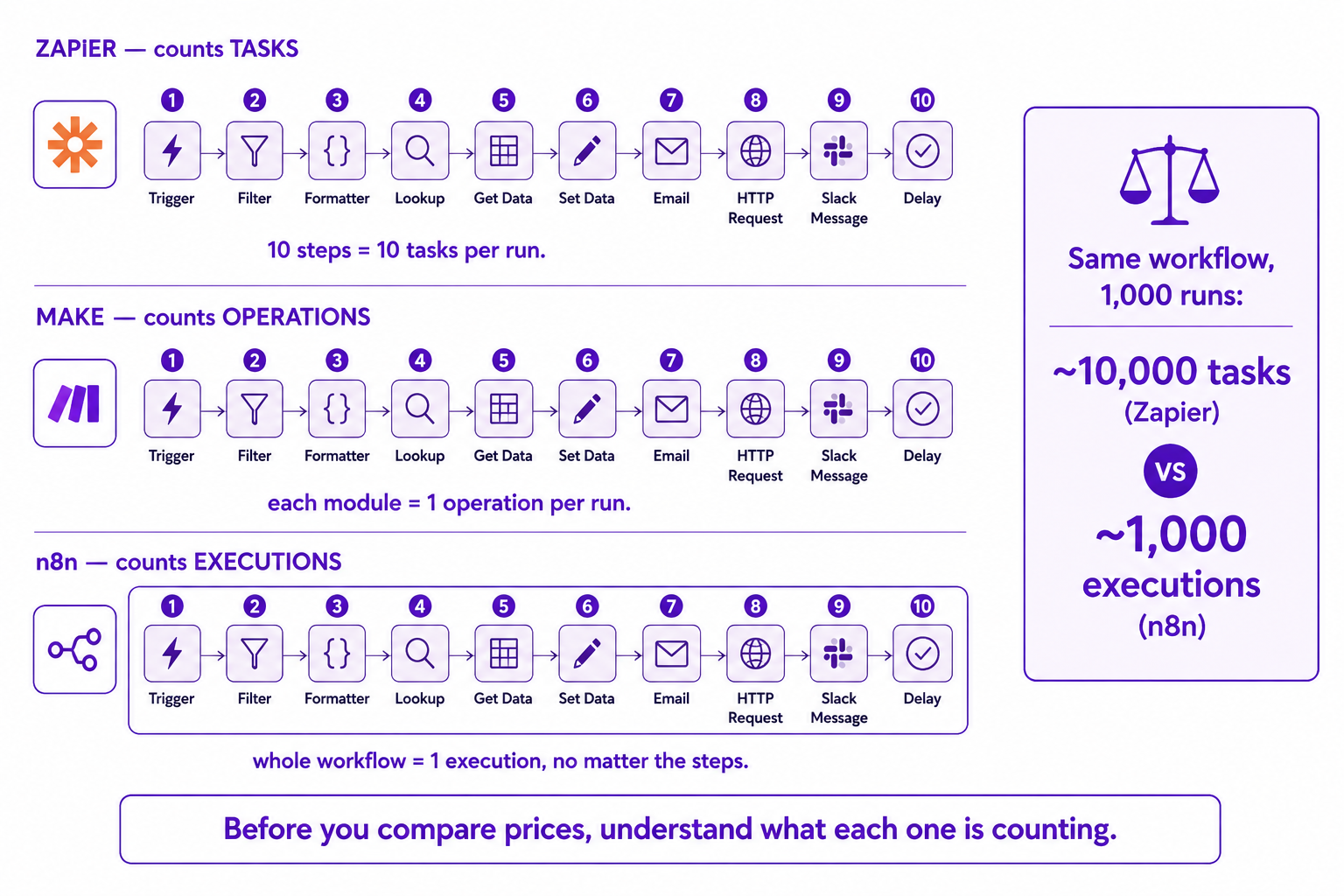
Zapier counts tasks. Every action step is a task. Ten action steps, run a thousand times, is roughly ten thousand tasks. Each step you add multiplies your count.
Make counts operations. Each module that runs is an operation, which is similar to Zapier's model in spirit, generally more generous in practice, often working out far cheaper for the same workflow.
n8n counts executions. The entire workflow running once is a single execution, no matter how many steps are inside it. That same ten-step workflow run a thousand times is just a thousand executions. The number of steps does not affect the count at all.
This is why the same logic can cost wildly different amounts. The more steps your workflows have, the more dramatically the task-based and operation-based models add up, and the more the execution-based model pulls ahead on price. A ten-step workflow that is expensive on Zapier is almost a rounding error on n8n. This single distinction explains most of the price gap people find shocking when they compare the three.
Zapier: the fastest to ship, the easiest to start
Zapier is the most widely used automation tool in the world, and its strength is simplicity and reach. It connects to more apps than anything else, with an integration catalogue in the thousands (over 7,000 apps as of early 2026), and its trigger-action setup is the cleanest in the industry. A non-technical person can build a useful automation in an afternoon with no training. If the tool you want to connect is obscure, Zapier most likely already supports it.
The trade-offs are cost and depth. Because it charges per task, costs climb steeply as your workflows get more steps or higher volume. Moving from light usage into the tens or hundreds of thousands of tasks a month pushes you onto expensive plans quickly. And its ceiling for complex logic is lower than the others. Branching, looping, and sub-workflows exist, but they feel bolted on rather than native.
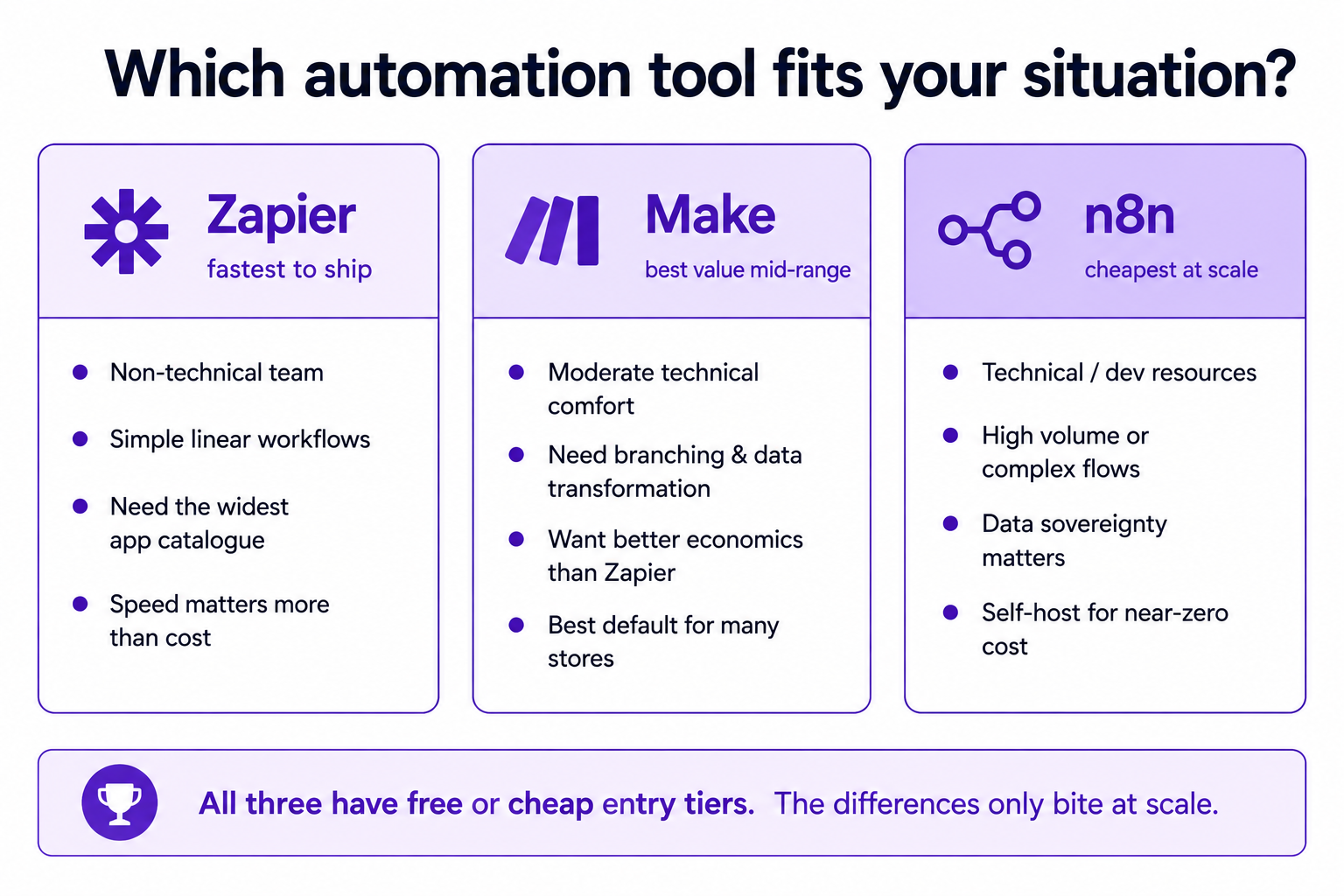
The honest summary: Zapier is the right call when speed-to-launch and breadth of integrations matter more than cost, your workflows are relatively simple and linear, and your team is non-technical. It is frequently the fastest to ship and rarely the cheapest at scale.
Make: the value pick for visual, branching workflows
Make (formerly Integromat) sits in the middle, and for a lot of e-commerce teams it is the sweet spot. Its visual scenario builder makes complex logic genuinely easier to follow than the alternatives, with branching, iterators, and data transformation that feel native rather than tacked on. And because of how it counts operations, it typically delivers far better value than Zapier for the same medium-complexity workflow, on the order of several times more work per euro.
The trade-offs are a steeper learning curve than Zapier and a model that can still surprise you. Make counts every iteration inside a loop and every branch in an error handler as operations, so a complex scenario with lots of looping can burn through your quota faster than the headline price suggests. It is better value than Zapier for most things, but "operations" is not a free unit, and busy scenarios add up.
The honest summary: Make is the right call for teams with moderate technical comfort who need real branching and data transformation, want better economics than Zapier, and are willing to spend a little time learning the scenario builder. For a lot of growing stores, it is the best default.
n8n: the cheapest at scale, if you have the technical capacity
n8n is the different animal of the three. It is open-source and can be self-hosted on your own server, and that one fact changes everything about its economics. Self-hosted, the software itself is free and there are no execution limits at all. Your only cost is the server, which for many workloads can be a small monthly VPS bill. Even on its managed cloud, because it charges per workflow execution rather than per step, it is dramatically cheaper for complex or high-volume workflows. For heavy multi-step automation, n8n's model can cut costs by a large margin compared to the per-task and per-operation tools.
It also goes the deepest. Full JavaScript and Python support, the strongest AI and agent node library of the three, and complete control over your deployment. And there is a data-sovereignty angle that matters for some businesses: self-hosted, your data never leaves your own infrastructure, which can be the deciding factor under strict compliance or privacy requirements. As a tool built in Berlin, that European data-control story resonates with a lot of teams here.
The trade-off is real and it is not about money. n8n asks more of you technically. Self-hosting means someone has to run, secure, and maintain the server. The cloud version removes that burden but reintroduces a per-execution cost (its 2026 cloud plans run from roughly €24/month for a starter tier up to higher business tiers). Even the cloud version assumes more comfort with technical concepts than Zapier does.
The honest summary: n8n is the right call for technically capable teams, for high-volume or complex workflows where the execution-based pricing wins big, and for situations where data sovereignty or deep customisation matters. If you have the ops capacity, it is almost always the cheapest at real scale.
How to actually choose
Strip away the detail and the decision comes down to a short honest path.
Start with your team. If the people building automations are non-technical and you want results this week, Zapier removes the most friction, and you can always migrate later. If your team has moderate technical comfort and you need real branching logic, Make gives you more power and better economics for a modest learning investment. If you have developer or serious technical resources, n8n opens up the lowest cost and the deepest capability, especially self-hosted.
Then sanity-check on volume and data. Under a few hundred runs a month, honestly, any of the free or cheap entry tiers will do and the choice barely matters. The differences only start to bite at scale, and that is exactly where the counting models diverge hardest, so model your real workflow against each tool's unit before you commit, not the headline price. And if your data is sensitive enough that it should not sit on a third party's servers, that single requirement points you at self-hosted n8n almost on its own.
One last piece of practitioner advice that applies whichever you pick: do not let the tool choice become a reason to delay. The cost of picking "the wrong one" early is almost always smaller than the cost of not automating at all while you deliberate. Pick the one that fits your team today, build the high-value workflows that actually move the needle, and migrate if and when you outgrow it. The tool is the implementation detail. The thinking about what to automate and what to leave alone is the part that actually matters, and it is the same no matter which of these three you are clicking around in.
A few common questions
Which is cheaper, Make, Zapier, or n8n? For simple low-volume workflows, all three are cheap or free. For complex or high-volume workflows, self-hosted n8n is dramatically the cheapest (the software is free, you pay only for a server), Make is generally better value than Zapier, and Zapier is rarely the cost winner past its entry tier. The reason is how they count: Zapier per task, Make per operation, n8n per whole workflow execution.
Why is the same workflow so much cheaper on n8n? Because n8n charges per workflow execution regardless of how many steps it contains, while Zapier charges per task (per step) and Make per operation (per module run). A 10-step workflow that counts as 10 tasks per run on Zapier counts as a single execution on n8n.
Which automation tool is best for a non-technical team? Zapier. It has the simplest setup, the largest app catalogue, and the gentlest learning curve. The trade-off is higher cost at scale and a lower ceiling for complex logic. Make is the next step up when you need branching and better value.
Do I need to self-host n8n? No. n8n offers a managed cloud version (starting around €24/month in 2026) that removes the maintenance burden. Self-hosting is what unlocks the near-zero cost and full data control, but it requires someone to run and secure the server.
You should also read:
Dynamic and Competitive Pricing: When to Move With the Market
Dynamic pricing means changing your prices in response to demand, time, inventory, or competitors. Competitive pricing means setting them relative to your rivals. Both can be smart in the right conditions and quietly destructive in the wrong ones, and the difference is almost never the…
Continue reading...
Support Metrics: Measure the Right Outcome, Not Just Speed
Most support metrics measure speed and cost: response time, average handle time, tickets closed per hour, SLA hit-rate, cost per contact. They're popular because they're easy to count and they roll up into tidy dashboards. The problem is that they reward the wrong behaviour. They…
Continue reading...
Self-Service vs Human Support: Where Each Actually Belongs
Self-service should handle the questions that don't need a human, so that humans are free for the ones that do. That's the whole rule, and almost every mistake in this area comes from breaking it in one of two directions: putting a human on work…
Continue reading...